
Integrations
Connect to external APIs with OAuth and configuration management
Integrations are the bridge between Bifrost and external APIs. They combine OAuth credentials, configuration, and organization-specific settings into a unified system.
What Are Integrations?
Section titled “What Are Integrations?”An integration represents a connection to an external service like Microsoft Graph, HaloPSA, or any REST API. Each integration can have:
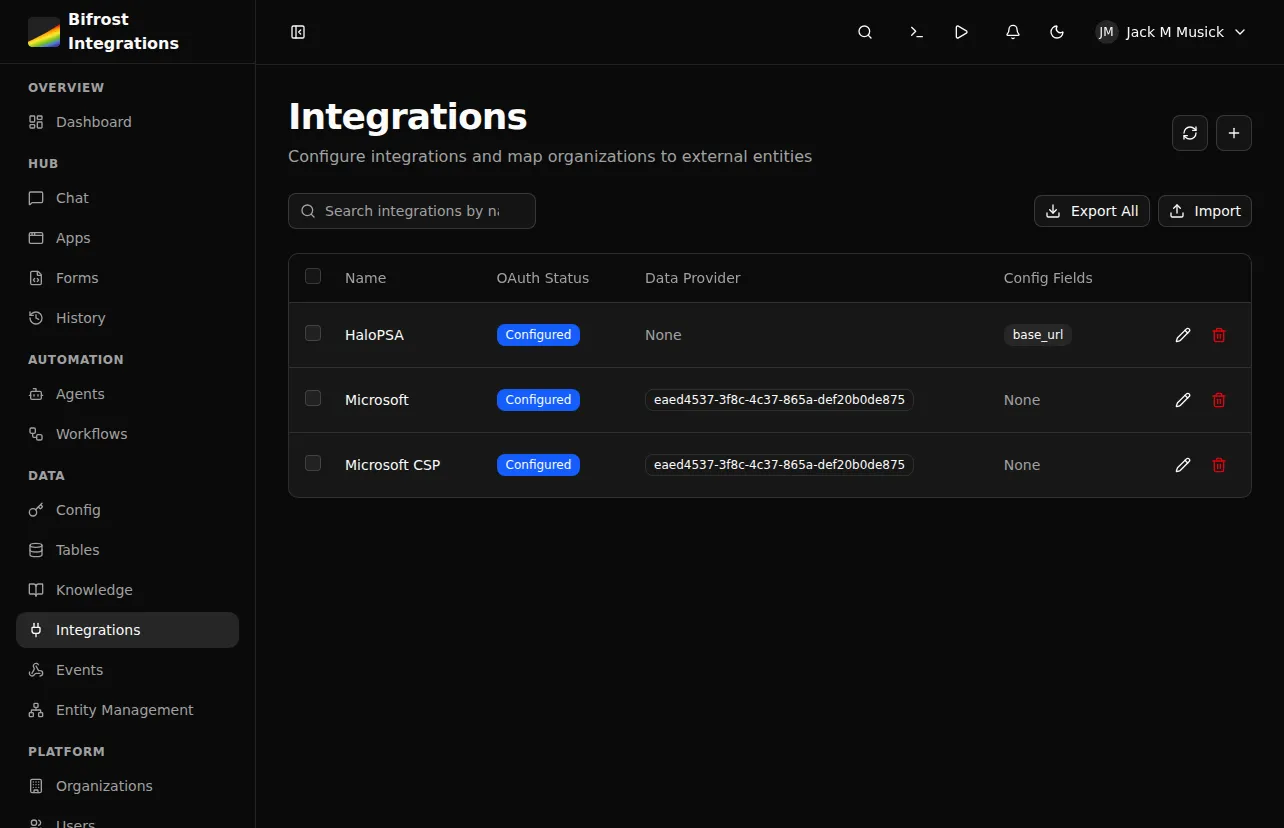
Integrations provide:
- OAuth credentials - Access tokens managed by Bifrost
- Configuration - API keys, base URLs, timeouts
- Entity mapping - Organization-specific tenant IDs or company IDs
- Generated SDK - Auto-generated Python client from OpenAPI spec
Two-Level Configuration
Section titled “Two-Level Configuration”Integrations support configuration at two levels:
| Level | Scope | Use Case |
|---|---|---|
| Integration defaults | All organizations | Base URLs, default settings |
| Organization overrides | Single organization | Tenant-specific IDs, custom endpoints |
When your workflow requests an integration, Bifrost merges defaults with org-specific overrides:
from bifrost import integrations
# Get merged configurationintegration = await integrations.get("HaloPSA")base_url = integration.config.get("base_url")  # Merged from defaults + orgtenant_id = integration.entity_id               # Org-specific
OAuth Management
Section titled “OAuth Management”Integrations replace the legacy oauth module with better organization:
# Old approach (deprecated)# from bifrost import oauth# conn = await oauth.get("Microsoft_Graph")
# New approachfrom bifrost import integrations
integration = await integrations.get("Microsoft_Graph")if integration and integration.oauth: token = integration.oauth.access_tokenEntity Mapping
Section titled “Entity Mapping”For multi-tenant APIs, integrations track external entity IDs per organization:
| Field | Description |
|---|---|
entity_id | The external ID (tenant_id, company_id) |
entity_name | Display name for the entity |
This enables one integration to serve multiple tenants:
# Each org has its own HaloPSA tenantintegration = await integrations.get("HaloPSA")tenant_id = integration.entity_id # "customer-123" for this orgConfig Schema
Section titled “Config Schema”Integrations define a schema for configuration values:
# Example schema[ {"key": "base_url", "type": "string", "required": True}, {"key": "api_key", "type": "secret", "required": True}, {"key": "timeout", "type": "int", "required": False}]Supported types:
string- Text valuesint- Integer valuesbool- Boolean flagsjson- Complex JSON objectssecret- Encrypted sensitive data
SDK Generation
Section titled “SDK Generation”Integrations can auto-generate Python SDKs from OpenAPI specs:
- Provide an OpenAPI spec URL
- Select authentication method (OAuth, API key, etc.)
- Bifrost generates a typed Python client
- Use the client in workflows with zero-config auth
# Generated SDK auto-authenticates via integrationfrom modules import example_api
result = await example_api.list_resources()  # Auth handled automatically
Access in Workflows
Section titled “Access in Workflows”from bifrost import workflow, integrationsimport httpx
@workflowasync def sync_data(): # Get integration with merged config and OAuth integration = await integrations.get("ExternalAPI")
if not integration: return {"error": "Integration not configured"}
# Use OAuth token headers = {} if integration.oauth: headers["Authorization"] = f"Bearer {integration.oauth.access_token}"
# Use config values base_url = integration.config.get("base_url")
async with httpx.AsyncClient() as client: response = await client.get(f"{base_url}/data", headers=headers) return response.json()Next Steps
Section titled “Next Steps”- Creating Integrations - Setup guide
- SDK Generation - Generate API clients
- Integrations Module - SDK reference