
Workflows
Understanding workflows in Bifrost
What Are Workflows?
Section titled “What Are Workflows?”Workflows are Python functions decorators to describe functionality to the platform. The Workflows page shows all available workflows organized by category.
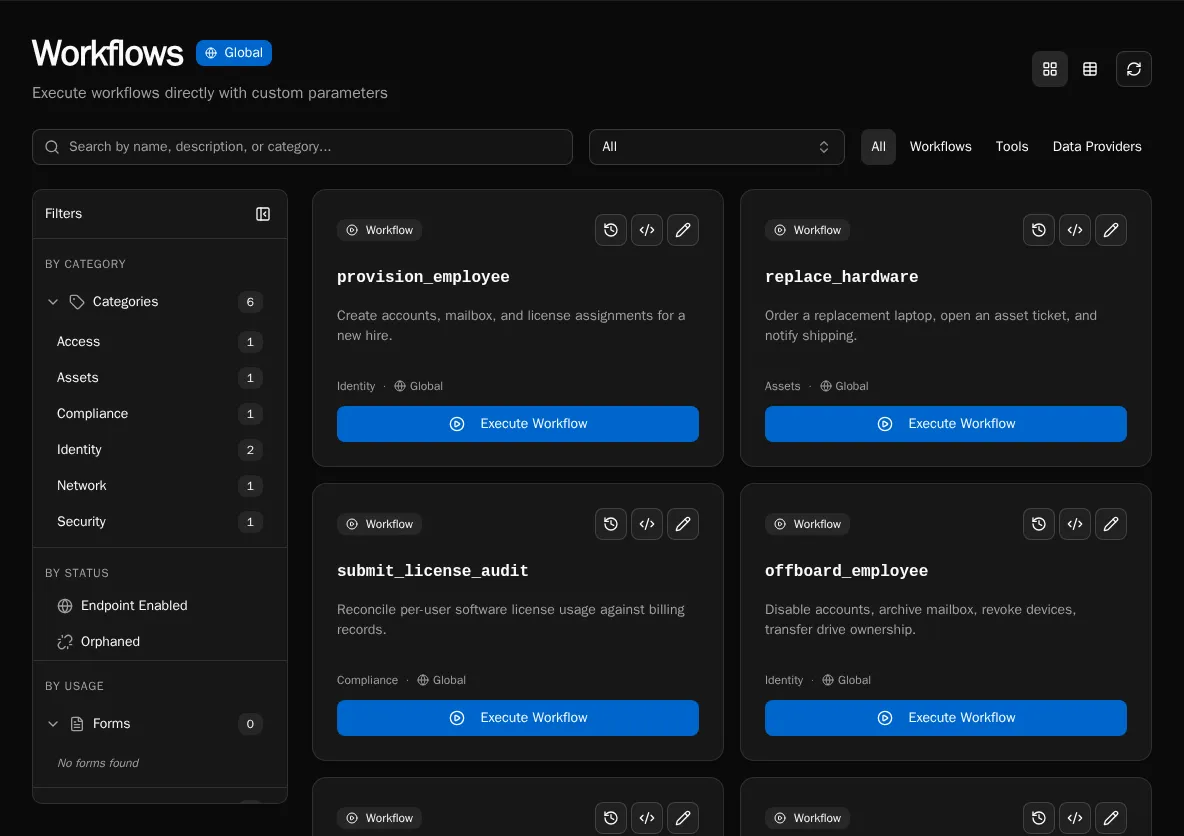
Workflows allow you to:
- Define and accept parameters that can be exposed forms or API calls
- Execute business logic
- Return results
- Are registered explicitly via Code Editor, API, or MCP
How They Work
Section titled “How They Work”from bifrost import workflow
@workflowasync def create_user(email: str, name: str): """Create a new user in the system.""" # Business logic here return {"user_id": "123"}The decorator automatically infers:
- name: from the function name (
create_user) - description: from the docstring
- parameters: from the function signature (type hints determine field types)
Workflow lifecycle:
- Developer writes Python function with
@workflowdecorator - Developer registers the function via Code Editor, API, or MCP
- Workflow appears in the UI
- Admins will usually create forms and tie them to workflows for execution
- Users execute via forms
- Results logged and displayed in realtime
Key Concepts
Section titled “Key Concepts”Registration
Section titled “Registration”Workflows require explicit registration after creating the file. Write your code, then register the function using the Code Editor, the POST /api/workflows/register endpoint, or the register_workflow MCP tool.
Workflow files are stored in S3 and synced to the /workspace directory in containers.
/workspace├── user_management.py├── license_automation.py└── reporting.pySee Workflow Registration for details on the registration process.
Parameters
Section titled “Parameters”Parameters are automatically extracted from your function signature:
@workflowasync def create_user( email: str, # Required string name: str, # Required string department: str = "IT", # Optional with default active: bool = True # Optional boolean): """Create a new user.""" passTo use a data provider for a parameter, configure it in the form builder by selecting the data provider for the field. The form will populate the dropdown dynamically while the workflow receives the selected value:
@workflowasync def create_user(email: str, department: str): """Create a new user.""" passExecution Context
Section titled “Execution Context”Every workflow receives ExecutionContext:
- Current user info
- Organization context
Execution Modes
Section titled “Execution Modes”The choice between Async or Sync is something you can avoid thinking about for the most part.
If a workflow is enabled as an endpoint, it will be synchronous by default. This is because you almost always are using this to get an immediate result.
If the workflow is not an endpoint, it will be asynchronous by default. This is because most other interactions will be with forms which will update in realtime as the workflow runs.
Synchronous:
- Runs immediately
- Returns result directly
- Best for quick operations (< 10s)
@workflow( name="export_ninjaone_devices_csv", execution_mode="sync")Asynchronous (default):
- Queued for background execution
- Returns execution ID immediately
- Best for long-running tasks (> 30s)
@workflow( name="export_ninjaone_devices_csv", execution_mode="async")Scheduled:
- Runs on cron schedule
- Best for recurring tasks
@workflow( name="export_ninjaone_devices_csv", schedule="0 9 * * *")Workflow Categories
Section titled “Workflow Categories”Organize workflows by purpose, defined completely by the developer.
Multi-Tenancy
Section titled “Multi-Tenancy”Workflows are organization-aware:
- Access organization-specific data via
context.org_idorcontext.organization - Use organization-scoped secrets and config
@workflow(name="get_org_data")async def get_org_data(context): # Automatically scoped to current org data = await db.query( "SELECT * FROM data WHERE org_id = ?", context.org_id ) return {"data": data}Workflow vs Form
Section titled “Workflow vs Form”Workflow: Backend Python function (business logic) Form: Frontend UI (user input collection)
Workflows can be:
- Executed directly via API
- Triggered by forms
- Scheduled to run automatically
- Called from other workflows
Forms always execute workflows, but workflows don’t require forms.
State & Logging
Section titled “State & Logging”Workflows are stateless but:
- Log progress with Python logging
- Return results
- Use external storage for state
- Capture runtime varialbes for troubleshooting purposes
import logging
logger = logging.getLogger(__name__)
@workflow(name="process_items")async def process_items(context, items: list):    logger.info(f"Processing {len(items)} items")
    for i, item in enumerate(items):        logger.info(f"Processing item {i+1}/{len(items)}")        # Process item
    return {"processed": len(items)}
Logs appear in execution detail view.
Error Handling
Section titled “Error Handling”Workflows return error states (don’t raise exceptions):
@workflow(name="example")async def example(context, param: str): try: result = await do_work(param) return {"success": True, "result": result} except Exception as e: return {"success": False, "error": str(e)}This allows:
- Partial success tracking
- User-friendly error messages
- Execution history
Security
Section titled “Security”Workflows inherit user permissions:
- Run as executing user
- Access org-scoped resources only
- Permission checks can be done via the context
@workflow(name="admin_task")async def admin_task(): # Check permissions in the workflow if not context.is_platform_admin: return {"error": "Admin privileges required"} # Perform admin operation passNext Steps
Section titled “Next Steps”- Build Your First Workflow - Hands-on tutorial
- Writing Workflows Guide - Complete guide
- Platform Overview - Architecture