
Reviewing agent run results
Walk flagged runs in the flipbook UI, set verdicts, and take notes
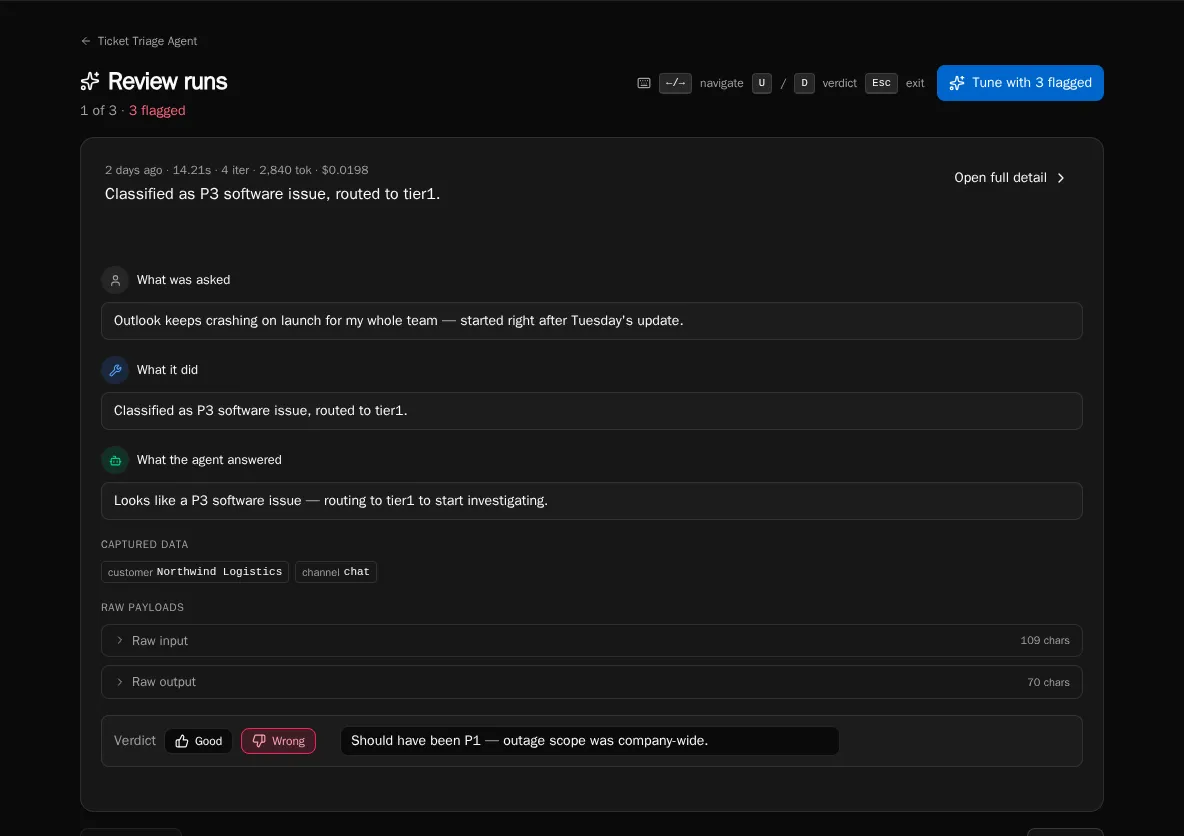
The Review page is a focused queue for an agent’s flagged runs. It pages through them one at a time so you can quickly decide whether each result was good, bad, or needs more thought — and feed the bad ones back into tuning.
Open the review queue
Section titled “Open the review queue”-
From the agent’s detail page, click Review (or open
/agents/{id}/reviewdirectly). -
The page loads with the agent’s currently-flagged runs. The header shows the position counter (
3 of 12) and the count of runs still flagged. -
If nothing is flagged, you’ll see the “Nothing to review” empty state — flag a run from the Runs tab first.
Navigate the flipbook
Section titled “Navigate the flipbook”-
Use the Previous / Next buttons or the dot pagination at the bottom to step through the queue.
-
Press ← / → (or j / k) on the keyboard to navigate without moving your hand to the mouse.
-
Press Esc to leave the queue and return to the agent detail page.
Set a verdict
Section titled “Set a verdict”-
Read the run summary (
asked/didblocks plus the response panel) on the current card. -
Press U for thumbs-up (good) or D for thumbs-down (flagged for tuning). The verdict mutation auto-advances to the next run.
-
To remove a verdict, set it to “needs review” — clicking the same verdict again clears it.
Add a review note
Section titled “Add a review note”-
Type a note in the verdict text field on the flipbook card. Notes are saved with the verdict.
-
The note appears on the run detail page and is included in the tuning conversation context.
-
Notes are optional but make consolidated tuning proposals dramatically better — they tell the LLM why the run was bad.
Open full run detail
Section titled “Open full run detail”-
Click Open full detail in the flipbook card header to jump to
/agents/{id}/runs/{runId}for the step-by-step timeline. -
Use the browser back button to return to the same position in the flipbook.
Move from review to tuning
Section titled “Move from review to tuning”-
When the header shows N flagged, click Tune with N flagged to jump into the tune workbench.
-
The workbench reads the same flagged set you just reviewed — your notes feed directly into the consolidated proposal.