
Tuning an agent's behavior
Generate prompt proposals from flagged runs, dry-run them, and apply with confidence
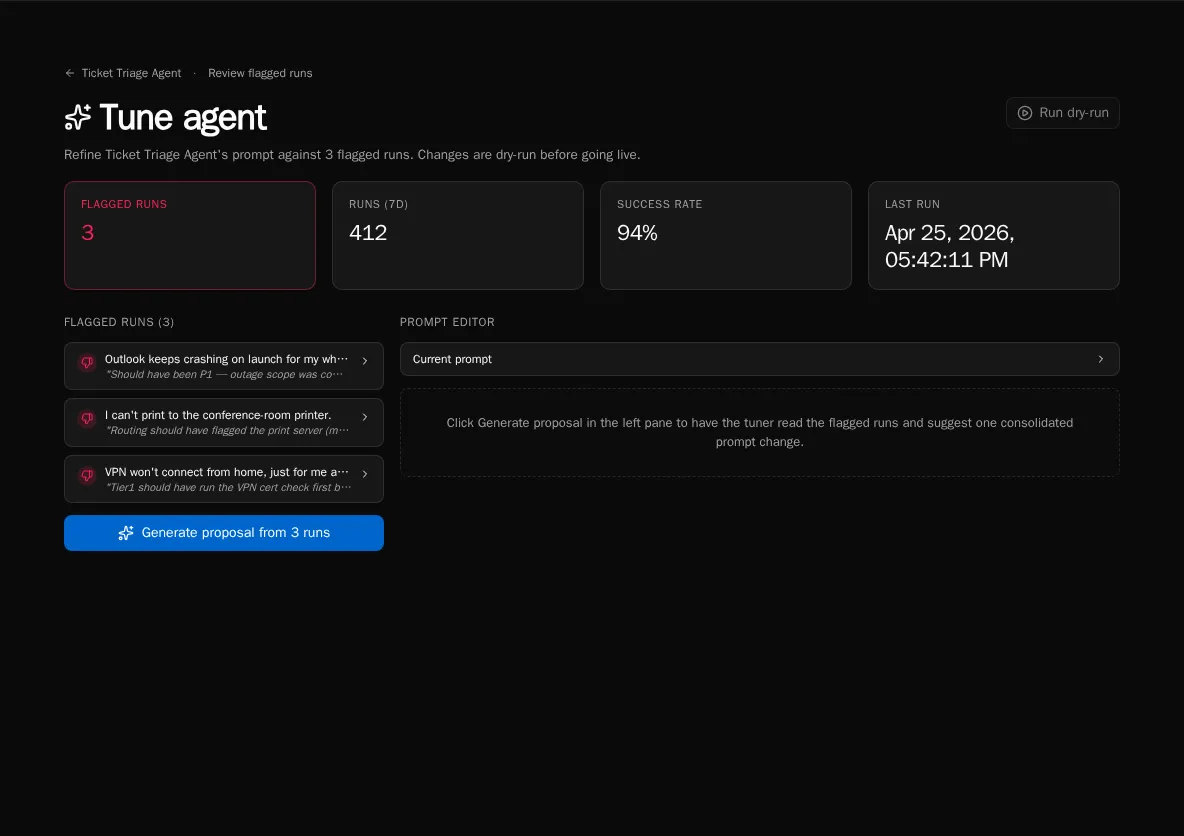
The Tune workbench is where you turn flagged runs into a better system prompt. The page reads your flagged set, generates one consolidated prompt proposal, lets you dry-run it against the same flagged runs, and then applies the change live.
Open the workbench
Section titled “Open the workbench”-
From the agent detail page click Tune (or visit
/agents/{id}/tune). -
The left pane lists every currently-flagged run with an expandable transcript so you can review the inputs the LLM will see.
-
The right pane is the prompt editor — empty until you generate a proposal.
Generate a proposal
Section titled “Generate a proposal”-
Click Generate proposal from N runs. The button is disabled if there are no flagged runs.
-
Bifrost reads the flagged transcripts and produces one consolidated proposal that addresses all of them, not one per run.
-
The proposal lands in the Proposed prompt (editable) pane. Edit freely — the diff updates live below the textarea.
Compare current vs proposed
Section titled “Compare current vs proposed”-
Expand Current prompt above the editor to see what’s live today.
-
The diff viewer below the editor highlights additions, removals, and unchanged passages between current and proposed.
-
Edit the proposal until the diff matches your intent, then proceed to dry-run.
Dry-run before applying
Section titled “Dry-run before applying”-
Click Run dry-run in the top-right header. The button is enabled once a proposal exists.
-
Bifrost replays each flagged run against the proposed prompt and reports whether the agent would have decided differently.
-
The results panel groups outcomes as Would change (good — the new prompt fixes the run) or Still wrong (bad — the proposal didn’t address that case).
Apply or discard
Section titled “Apply or discard”-
If the dry-run looks good, click Apply live. The new prompt is saved to the agent and takes effect for future runs immediately.
-
If you want to start over, click Discard to clear the proposal and re-generate from a different flagged set.
-
After applying, the page redirects back to the agent detail. Future runs use the new prompt.
Iterate
Section titled “Iterate”-
Apply the prompt, let new runs accumulate, then mark any that still go wrong as flagged.
-
Return to Tune — the workbench will read the new flagged set and propose another consolidated revision.
-
Repeat until the agent’s behavior matches what you want.