
Develop with Your Favorite Tools
- Use VS Code, Claude Code, and Git for version control
- Build with Python and modern development workflows
- Test locally before deploying to production
Understanding Bifrost's architecture and core concepts
Bifrost Integrations is an open-source automation platform designed to democratize best-in-class tooling for the emerging Integration Services industry - before venture capital gets the chance to own something we’re all incredibly passionate about: solving problems with automation.
Existing RPA platforms are great for rapid development and provide helpful abstractions for things like OAuth, but they cannot and will not keep pace with AI-powered development and have always been constrained by limitations that traditional programming languages do not have.
Bifrost Integrations removes those limitations by creating a light management layer with the features that make RPA’s uniquely valuable and letting Python do what it’s good at. It’s architected with multi-tenancy at its core, enabling you to scale your Integration Services business without duplicating work across customers. This is not another RPA tool trying to be everything to everyone; it’s a platform designed specifically to help you build scalable automation businesses the right way, without vendor lock-in, and without the limitations of RPA.
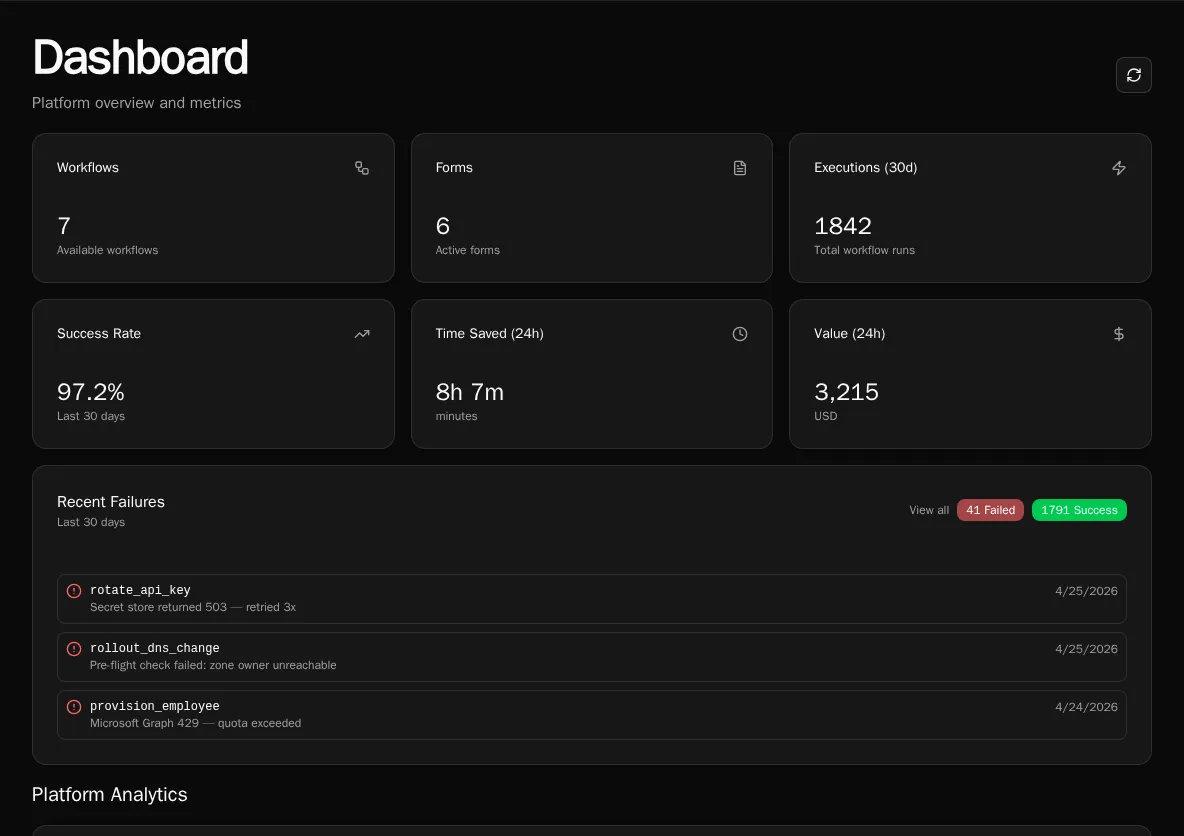
The Bifrost Dashboard provides a high-level overview of your platform, including workflow counts, form statistics, execution metrics, and recent failures.
Develop with Your Favorite Tools
Build Reusable Integrations
Centralized Connection Management
Dynamic Forms and Workflows
Multi-Tenant Architecture
AI Agents
AI-Assisted Development
┌─────────────────────────────────────────┐│ Client (React) ││ Forms | Workflows | Admin │└────────────────┬────────────────────────┘ │ REST API / WebSocket ▼┌─────────────────────────────────────────┐│ API (FastAPI) ││ HTTP Handlers | Auth | Workflow Engine │└────────────────┬────────────────────────┘ │ ┌────────────┼────────────┐ ▼ ▼ ▼┌────────┐ ┌────────┐ ┌────────┐│Worker │ │Scheduler│ │ MinIO ││(async) │ │(cron) │ │ (S3) │└────────┘ └────────┘ └────────┘ │ │ │ └────────────┼────────────┘ ▼┌─────────────────────────────────────────┐│ PostgreSQL | RabbitMQ | Redis │└─────────────────────────────────────────┘| Component | Purpose |
|---|---|
| API | HTTP endpoints, authentication, workflow execution |
| Worker | Background job processing (scalable, downloads workspace from S3) |
| Scheduler | Runs scheduled workflows and cleanup jobs |
| MinIO/S3 | Object storage for workspace files |
| PostgreSQL | Primary database for all data |
| RabbitMQ | Message queue for async job dispatch |
| Redis | Sessions, cache, sync execution results |
Python async functions decorated with @workflow:
@workflowasync def create_user(email: str, name: str): """Create a new user in the system.""" return {"user_id": "123"}The decorator auto-infers name, description, and parameters from your function. After writing your code, you register the function to make it available in the UI, forms, scheduled jobs, and webhooks.
UI for workflows with:
Dynamic options for dropdowns:
from bifrost import data_provider, context
@data_provider(name="get_departments")async def get_departments(): org_id = context.org_id # Access via proxy if needed return [ {"label": "Engineering", "value": "eng"}, {"label": "Sales", "value": "sales"} ]AI agents that use workflows as tools:
max_iterations, max_token_budget) bound resource usageWorkflows are registered explicitly after you write the code:
@workflow or @data_provider decoratorsWhen you edit files in the UI editor, changes are pushed to workers via RabbitMQ, keeping all instances in sync. This enables you to organize your code by feature, customer, or whatever you find most useful.