
Configuration
Named key-value settings that workflows read at runtime — base URLs, API keys, feature flags, and secrets — scoped to a single organization or shared globally.
Configuration is how you keep environment-specific values out of workflow code. Instead of hard-coding a HaloPSA URL or an SLA threshold, a workflow reads a named config key at runtime, and the value resolves against the organization the workflow is running for. The same workflow then behaves differently per customer without a code change.
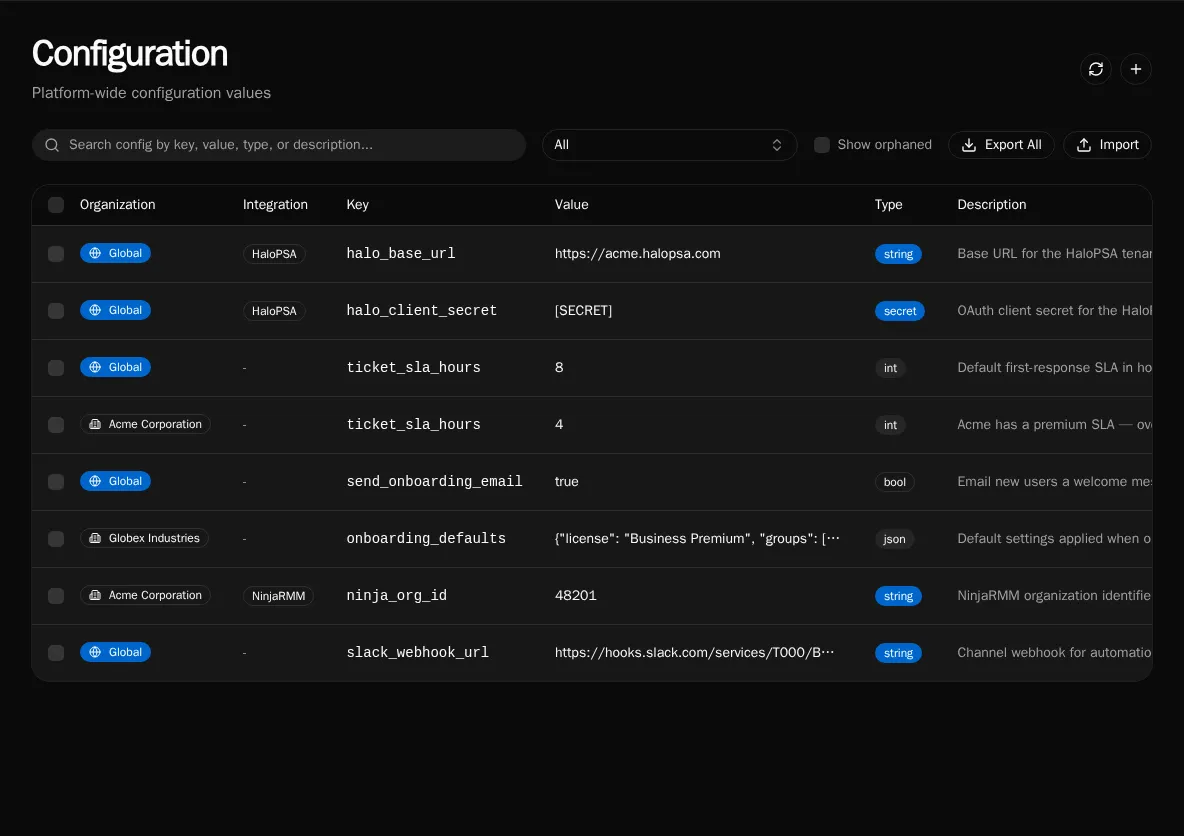
Config types
Section titled “Config types”Each entry has a type that controls how the value is stored and rendered:
- string — plain text, such as a base URL or an identifier.
- int — a whole number, such as an SLA threshold in hours.
- bool —
trueorfalse, for feature flags. - json — a structured object or array, for grouped defaults.
- secret — an encrypted value (API keys, client secrets). Secret values are masked in the table and returned as
[SECRET]in list responses; only workflow execution decrypts them.
Global vs organization scope
Section titled “Global vs organization scope”A config is either Global (shared across every organization) or org-scoped (belongs to one organization). When a workflow runs, an org-scoped value of the same key overrides the global one. This is the same cascade every scoped resource follows — see Scopes: Global vs Organization for how resolution works in workflow code.
In the example above, ticket_sla_hours is 8 globally but 4 for Acme — Acme’s workflows see 4, everyone else sees 8.
Integration-managed configs
Section titled “Integration-managed configs”Configs tied to an integration show the integration name in a badge. These keys are defined by the integration’s config schema rather than created by hand, and editing them updates the values the integration uses. Deleting the integration’s schema removes the associated values, so manage them through the integration rather than the config table.
Orphaned configs
Section titled “Orphaned configs”When a Solution is uninstalled, the config values it created are left behind rather than deleted, so you do not lose data the rest of your automations may still depend on. These appear with an Orphaned badge noting the solution they came from. They are hidden by default — toggle Show orphaned to review and clean them up.
Reading config in a workflow
Section titled “Reading config in a workflow”Workflows read config by key. The active organization context determines which value resolves:
base_url = await config.get("halo_base_url")sla_hours = int(await config.get("ticket_sla_hours"))Before deleting a key, search your workspace for its usage — a workflow that reads a missing key fails at runtime:
rg -n "config.get\(.halo_base_url.\)" workflows/Managing configuration
Section titled “Managing configuration”Create, edit, and delete entries from the Configuration page, or script the same operations with the CLI:
bifrost config set halo_base_url --value "https://acme.halopsa.com" --type string --globalbifrost config set ticket_sla_hours --value 4 --type int --org <org-uuid>bifrost config listPlatform admins can also Export selected keys and Import them into another environment from the same page.