
Entity Management
A single board for reassigning the organization and access scope of every workflow, form, agent, and app — drag entities onto an organization or access level to rescope them in bulk.
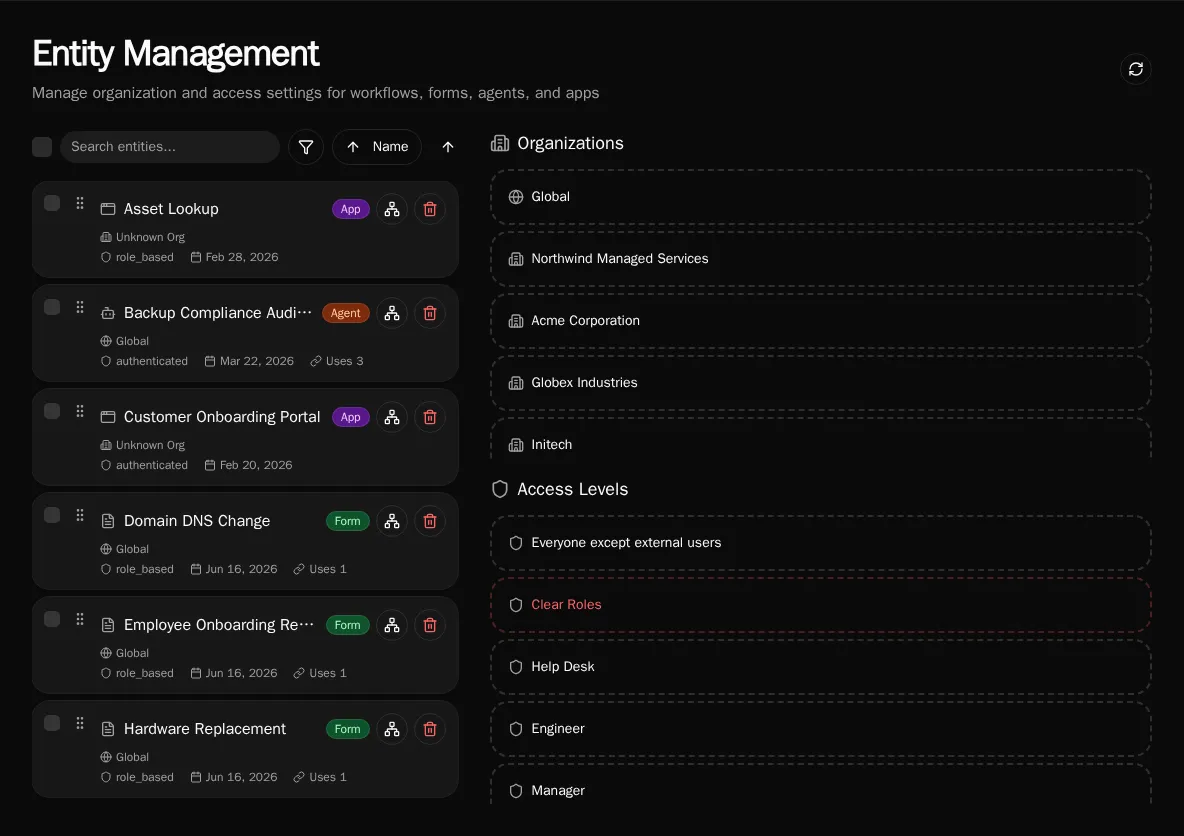
Entity Management is one board for the scope settings that otherwise live on four separate pages. Every workflow, form, agent, and app appears in a single searchable list, and you reassign its organization or access level by dragging it onto a target. It answers the questions that span entity types: what does this customer actually have, what is shared globally, and what is unused.
Why a unified board
Section titled “Why a unified board”Scope is a cross-cutting property. A new customer needs a handful of forms, an agent, and an app all moved into their organization at once; an offboarding sweep needs the inverse. Editing each entity on its own page is slow and easy to get half-done. The board collapses that into one drag — select many entities, drop them on an organization, and every one is rescoped in a single pass.
The two columns
Section titled “The two columns”The left column is the entity list. The right column is the set of drop targets, split into two sections:
- Organizations — every organization plus a Global target. Dropping entities here sets their
organization_id, moving them between a customer’s private scope and the shared global scope. - Access Levels — Authenticated (any signed-in user), Clear Roles (strip role assignments), and one target per role. Dropping entities here sets their access level or role-based grants.
Filtering and search
Section titled “Filtering and search”The list combines four entity types, so filters keep it legible:
- Type — workflow, form, agent, or app.
- Organization — a specific customer, or Global for shared entities.
- Access — authenticated versus role-based.
- Usage — In use versus Unused, computed from each entity’s dependency count.
The Unused filter is the fastest way to find dead entities before a cleanup. Combine it with a type filter to audit, for example, every form no other entity depends on.
Relationship view
Section titled “Relationship view”Select an entity’s relationship action to filter the list down to everything connected to it — the workflows a form calls, the tools an agent uses, the entities an app renders. The same data drives a dependency graph dialog so you can see the chain before you delete or rescope a node. This is the safe way to check what breaks before removing a shared workflow.
Bulk delete
Section titled “Bulk delete”Selecting entities also enables bulk delete. Forms, agents, and apps are removed directly. Workflows route through the deactivation flow: if a workflow is still referenced, Bifrost surfaces the dependents and offers replacements rather than silently breaking them. Delete is destructive — the relationship view exists so you can confirm the blast radius first.
Who can use it
Section titled “Who can use it”Entity Management is a platform-admin surface. It reassigns scope and access across every organization, so it is gated to administrators rather than per-organization members.