
Organizations
The tenant boundary in Bifrost — every config, connection, table row, and automation is scoped to an organization or shared globally across all of them.
An organization is the tenant boundary in Bifrost. As an MSP, you run one platform and represent each customer as an organization. Configs, OAuth connections, table rows, forms, and automations either belong to a single organization or are shared globally across all of them.
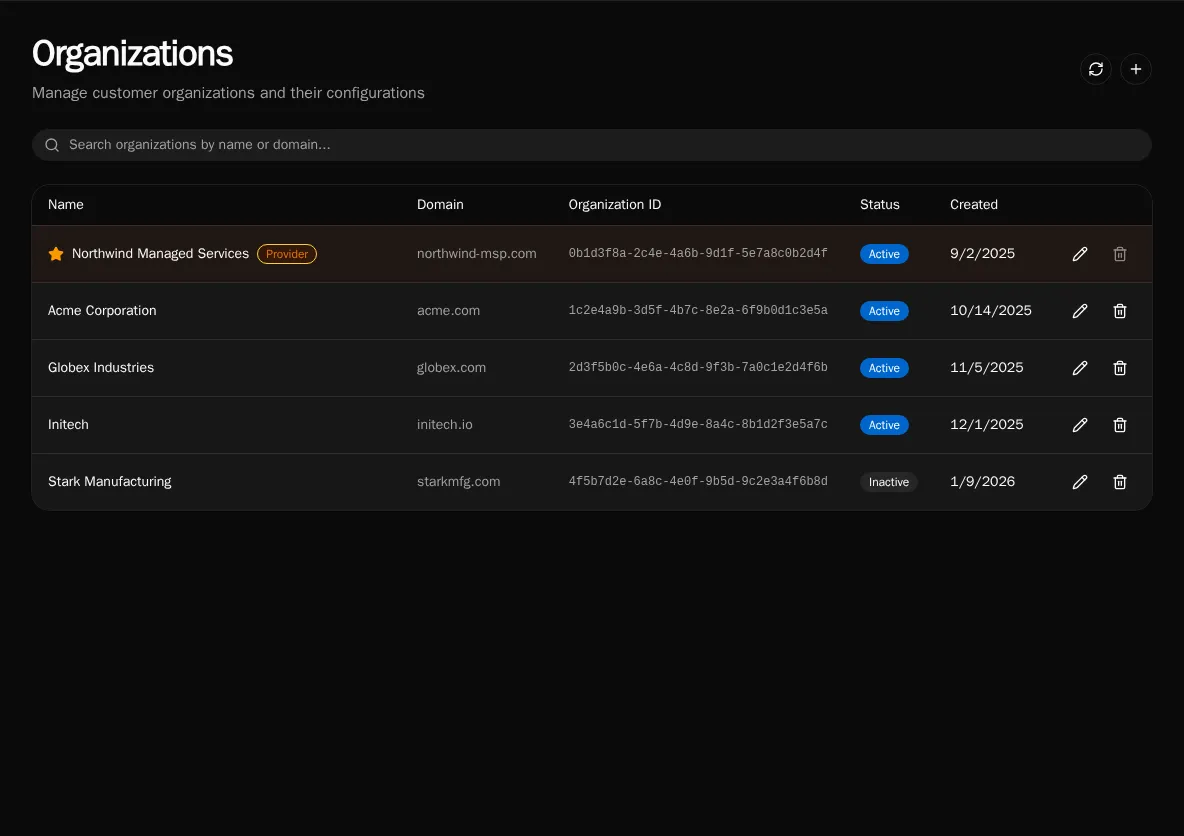
The provider organization
Section titled “The provider organization”One organization is marked as the provider — your own MSP. It is created automatically, cannot be deleted, and is highlighted with a star. Members of the provider organization can resolve and manage resources across every customer organization, which is how platform-wide automations and shared integrations work.
Scope cascade
Section titled “Scope cascade”Every scoped resource resolves against the active organization first, then falls back to the global scope:
- Organization (
organization_id = UUID) — visible only inside that one organization. - Global (
organization_id = None) — visible to every organization as a shared default.
A customer-specific OAuth connection or config overrides the global one of the same name when a workflow runs in that organization’s context. See Scopes: Global vs Organization for how this resolution works in workflow code.
Email-domain auto-provisioning
Section titled “Email-domain auto-provisioning”Set an organization’s email domain (for example acme.com) and any new user who signs in with a matching address is automatically placed in that organization. This removes manual user assignment for customers who use SSO.
Active vs inactive
Section titled “Active vs inactive”Deactivating an organization keeps its data intact but takes it out of active rotation — useful for offboarded customers you are not ready to delete. Inactive organizations are shown with a muted status badge and can be reactivated at any time.
Managing organizations
Section titled “Managing organizations”Create, edit, and delete organizations from the Organizations page, or script the same operations with the CLI:
bifrost orgs create --name "Acme Corporation" --domain acme.combifrost orgs listThe provider organization is the only one that cannot be deleted.