
Branding & Terminology
Set your platform's primary color, upload logos, and rename Apps, Agents, and Forms to match your product.
The Branding tab lets you white-label the platform: an application name, a primary brand color, square and rectangle logos, and custom names for the three fixed product nouns (Apps, Agents, Forms). Branding is global — it applies to every organization on the instance, not per-org.
Open the page
Section titled “Open the page”Go to Settings → Branding, or directly to /settings/branding.
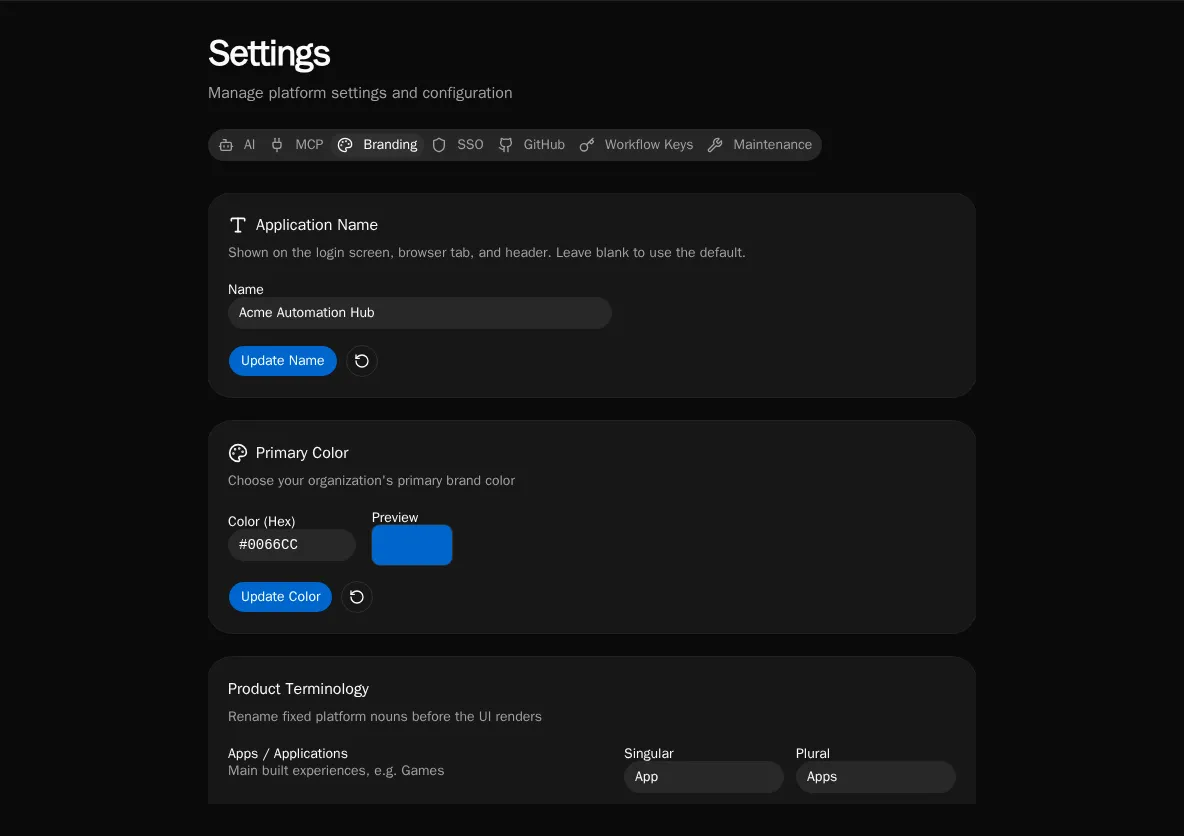
Application name
Section titled “Application name”Set the product name shown across the UI — the browser tab title, the login screen, and the header. Enter a name and click Update Name; leave it blank to fall back to the default “Bifrost.” Like the rest of branding, the name is served to unauthenticated users too, so the login page reflects it before sign-in.
Primary color
Section titled “Primary color”Enter a hex value (e.g. #0066CC) and click Update Color. The swatch previews the color, and on save it’s converted to OKLCH and applied to every primary surface — buttons, links, sidebar accents — instantly, including a lightened dark-mode variant. Click the reset (↺) button to return to the platform default.
Product terminology
Section titled “Product terminology”Rename the fixed platform nouns before the UI renders. Each noun takes a singular and plural label:
| Noun | Default | Example override |
|---|---|---|
| Apps / Applications | App / Apps | Game / Games |
| Agents | Agent / Agents | Character / Characters |
| Forms | Form / Forms | Request / Requests |
Edit the cells and click Update Terminology. The new labels propagate through navigation, page titles, and buttons. Blank fields fall back to the platform default — you can’t clear a label to empty.
Upload a square logo (1:1, used for the sidebar icon and favicon-style spots) and a rectangle logo (16:9, used in the header). Drag a file onto the drop zone or click to browse.
- Accepted formats: PNG, JPG, SVG
- Max size: 5 MB
- Click the reset (↺) button on an uploaded logo to revert to the default mark
Logos are stored globally and preloaded on app boot so the branded chrome paints without a flash of the default logo.
See also
Section titled “See also”- Audit Log — branding changes are control-plane mutations
- Permissions — what gates the platform-admin-only Settings tabs