
Workflow Keys
Generate and manage API keys that let external systems trigger Bifrost workflows over HTTP.
Workflow Keys are API keys that external systems use to trigger Bifrost workflows over HTTP, without a user session. A CI pipeline, a CRM webhook, or a billing job presents the key in a request header and the workflow runs. Each key is either global (can execute any endpoint-enabled workflow) or workflow-specific (scoped to one workflow).
Open the page
Section titled “Open the page”Navigate to Settings → Workflow Keys, or go directly to /settings/workflow-keys.
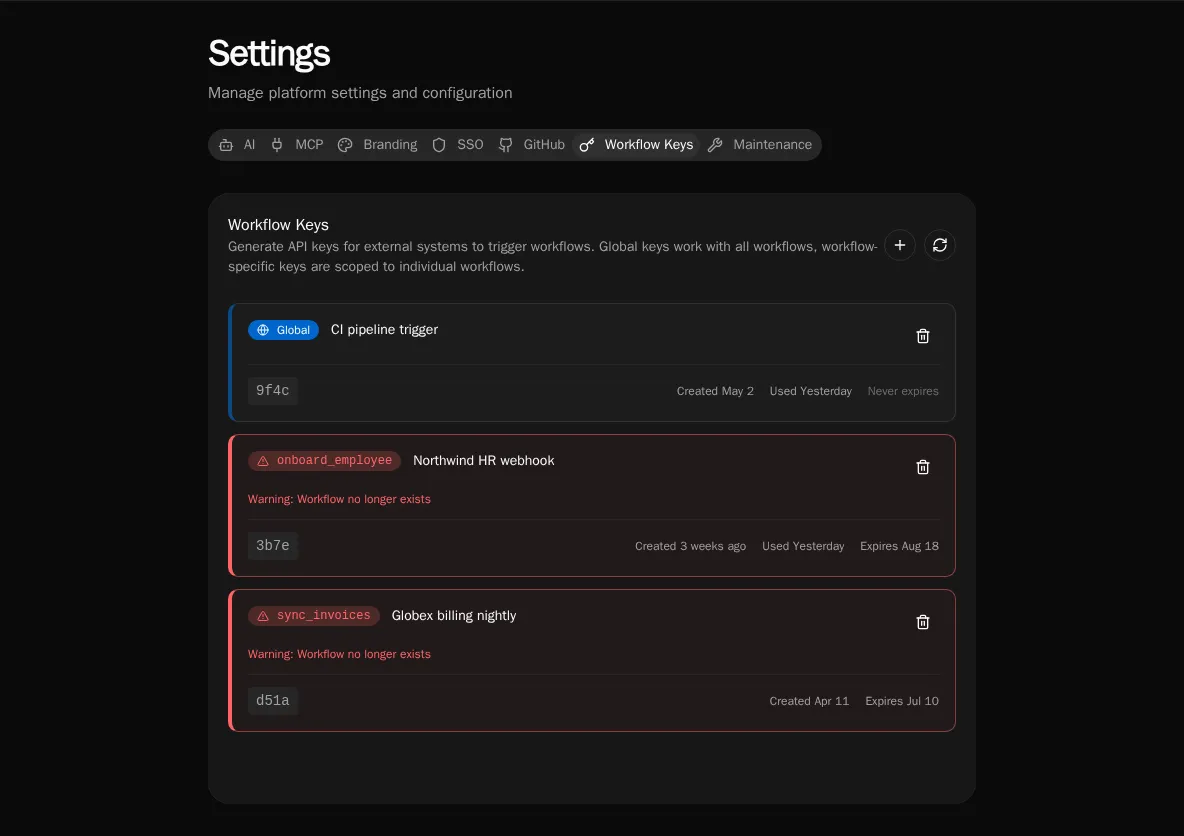
Each card shows the key’s scope (a Global badge or the workflow name), its description, the masked key (last four characters), when it was created and last used, and its expiration.
Create a key
Section titled “Create a key”Click the + button in the top right. In the dialog:
- Description (required, max 32 chars) — a label so you can tell keys apart later, e.g.
CI pipeline trigger. - Global Key — check this to let the key execute any endpoint-enabled workflow. Leave unchecked to scope it to one workflow.
- Workflow (required when not global) — the workflow this key may trigger. Only endpoint-enabled, non-public workflows that don’t already have a key appear in the list.
- Expiration —
Never, or 30 / 60 / 90 / 180 / 365 days. Defaults to 90 days.
On submit, the key is shown once with a ready-to-paste curl example. Copy it before closing the dialog.
Trigger a workflow
Section titled “Trigger a workflow”Present the key in the X-Bifrost-Key header and POST your input to the workflow’s endpoint:
curl -X POST "$BIFROST_URL/api/endpoints/<workflowId>" \ -H "X-Bifrost-Key: bk_live_xxxxxxxx" \ -H "Content-Type: application/json" \ -d '{"input": "your data"}'A global key works against any endpoint-enabled workflow ID. A workflow-specific key only works against the workflow it was scoped to — any other ID returns 403.
Revoke a key
Section titled “Revoke a key”Click the trash icon on a key’s card and confirm. Revocation is immediate and irreversible: any system using that key starts getting rejected on the next request. Revoke promptly when a key leaks or a downstream integration is retired.
Orphaned and expired keys
Section titled “Orphaned and expired keys”A key whose target workflow no longer exists is flagged as orphaned (red border, warning badge) and sorts to the bottom — its workflow was renamed or deleted out from under it. Expired keys carry an Expired badge. Both still occupy a slot but can no longer execute; revoke them to clean up.
Disable global keys for a workflow
Section titled “Disable global keys for a workflow”A sensitive workflow can opt out of global keys entirely, so only a workflow-specific key can reach it. This is the disable_global_key flag on the workflow itself — set it on the workflow when you want to force per-workflow key issuance for that endpoint.
See also
Section titled “See also”- Audit Log — key creation and revocation are recorded as control-plane events.
- Permissions — what a triggered workflow can do once it runs.